Free Color Picker + Tailwind Generator

Tailwind Color Palette Generator
with Color Wheel + Eyedropper

Use this free online color picker to choose any base color, then generate a full Tailwind CSS scale from shade 50 to 950. Export CSS variables, copy color codes, and paste a ready-to-use tailwind.config.js block in one click.

Open Color Picker + Tailwind Generator

Tailwind CSS Custom Color Generator

Pick any color on the wheel or paste a HEX value and Free Color Tool instantly generates a complete, Tailwind-compatible color scale from shade 50 to 950 — following the same lightness and saturation curve as the official Tailwind palette.

  • Full 11-shade scale (50, 100, 200 … 900, 950) generated in real time
  • Compare side-by-side with the closest official Tailwind color family
  • Export CSS Variables — one click copies all 11 shades as CSS custom properties named --color-brand-50 through --color-brand-950 to your clipboard
  • Export tailwind.config.js — one click copies a ready-to-paste theme extend colors block for your Tailwind config
  • Click any swatch to copy its HEX value instantly
shade-50 shade-100 shade-200 shade-300 shade-400 shade-500 shade-600 shade-700 shade-800 shade-900 shade-950

Ready-to-Use Export Formats

Don't waste time manually writing color tokens. Free Color Tool generates production-ready output in two formats — copy and paste straight into your project.

CSS Variables (Export CSS)
:root {
  --color-brand-50:  #fdf2f8;
  --color-brand-500: #ec4899;
  --color-brand-950: #500724;
}
Tailwind Config (Export Config)
// tailwind.config.js
module.exports = {
  theme: {
    extend: {
      colors: {
        'brand': {
          50:  '#fdf2f8',
          500: '#ec4899',
          950: '#500724',
        },
      },
    },
  },
};

Interactive HSL Color Wheel

Click or drag anywhere on the wheel to pick a color. The wheel renders gradients across all 360° of hue with lightness fading from center to edge — giving you full HSL control visually. Every pick instantly updates your custom Tailwind scale.

  • Full 360° hue selection by position on wheel
  • Brightness and saturation controlled by distance from center
  • Touch-friendly — works perfectly on mobile and tablet
  • HEX input syncs dot position and Tailwind scale in real-time

Browser EyeDropper API

Click the Eyedropper button and pick any color from anywhere on your screen — other browser tabs, your Figma designs, reference images, anything visible. The picked color instantly feeds into the Tailwind CSS scale generator.

  • Works on Chrome, Edge, and Opera (EyeDropper API supported)
  • Picks from any pixel on screen — not just the app window
  • Tailwind scale regenerates instantly from the picked color
  • Combine with palette slot assignment to build full brand systems

Every Color Format Instantly

The Color Information panel populates instantly as you pick. All nine color models are shown simultaneously. Click any row to copy to clipboard.

HEX RGB HSL CMYK LAB LCH XYZ LUV HWB

Color name detection maps your picked color to the closest named CSS color or Pantone-like name from a curated database of 2000+ color names.

WCAG Contrast Checker

Instantly check if your foreground/background color combination meets WCAG 2.1 accessibility guidelines — essential when building accessible Tailwind UI components with your custom color scale.

  • Computed contrast ratio (e.g. 4.5:1 minimum for AA)
  • Live text preview at normal and large sizes
  • Tints & shades scale — 20 variations from dark to light
  • Apply any Tailwind shade directly to a palette slot
Real Product Screenshots

See the Color Picker and Tailwind Workflow in Action

These screenshots use the actual app interface, so visitors can understand the full path from picking one color to shipping a complete Tailwind-ready system.

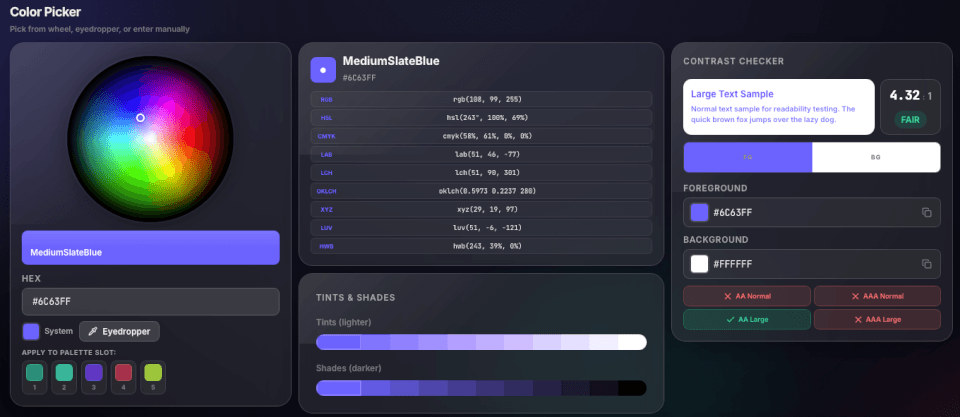
Color picker app screenshot showing the wheel picker, color formats, tints and shades, contrast checker, and palette slots.
Pick

Choose a source color and validate it instantly

Start with the wheel, the eyedropper, or manual HEX input. The app immediately shows every key color format, a live contrast checker, tints and shades, and palette-slot assignment for broader workflows.

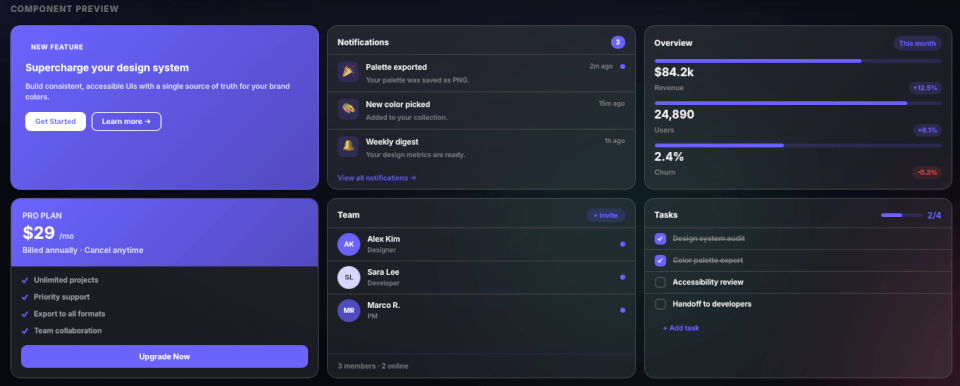
Component preview screenshot showing cards and dashboard modules styled with the selected color system.
Preview

Test the palette inside realistic UI components

The component preview screen helps teams see how a selected color behaves across cards, dashboards, CTAs, and product UI, so the system works in interfaces instead of only in isolated swatches.

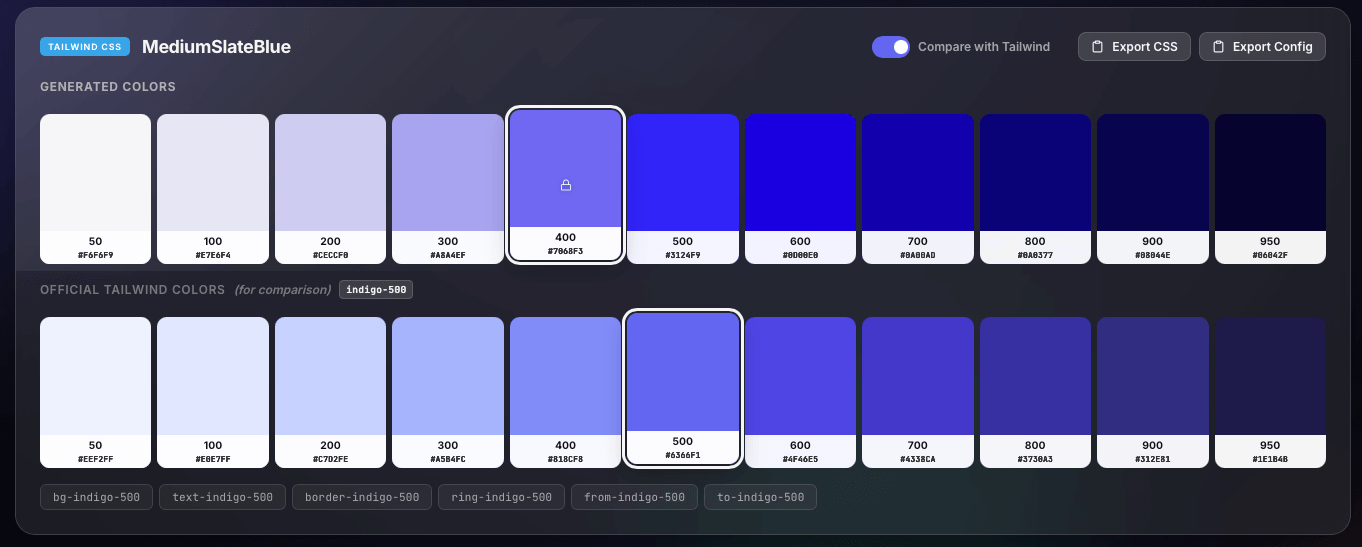
Tailwind comparison screenshot showing generated 50 to 950 colors, official Tailwind comparison, and export buttons.
Generate

Build a full Tailwind scale and compare it with Tailwind

Once the base hue is chosen, the tool expands it into shades 50 through 950, compares the generated family with the closest official Tailwind palette, and exposes one-click export actions for CSS and config output.

Tailwind Generator for Design Systems, UI Kits, and Web Projects

Use this Tailwind color generator when you need more than a single hex value. It connects picking, accessibility, and implementation so designers and developers can work from one source color.

  • UI UX design: test interface colors before adding them to a design system
  • Web design: move from a color wheel decision to CSS-ready tokens without manual shade building
  • Front-end development: generate Tailwind-compatible scales and validate WCAG contrast in one place
  • Brand systems: turn a primary brand color into reusable product, marketing, and documentation shades

Related tools

Tailwind Color Generator FAQ

Common questions about using the color wheel, eyedropper, and Tailwind 50-950 scale generator.

Start with one base color, then the tool generates a full Tailwind-style scale from 50 to 950 so you can use consistent lighter and darker shades in your UI.

Yes. You can pick colors visually on the wheel, paste HEX values, or use the browser EyeDropper to sample any visible pixel on your screen.

Yes. The tool provides output you can copy directly into tailwind.config.js as well as CSS custom properties for component libraries and design systems.

Yes. It is built for UI UX designers, web designers, and front-end developers who need fast color decisions, accessible shades, and production-ready tokens.

Generate your Tailwind color scale

Pick any color, get a full Tailwind CSS scale. Free, no login.

Open Tailwind Color Generator